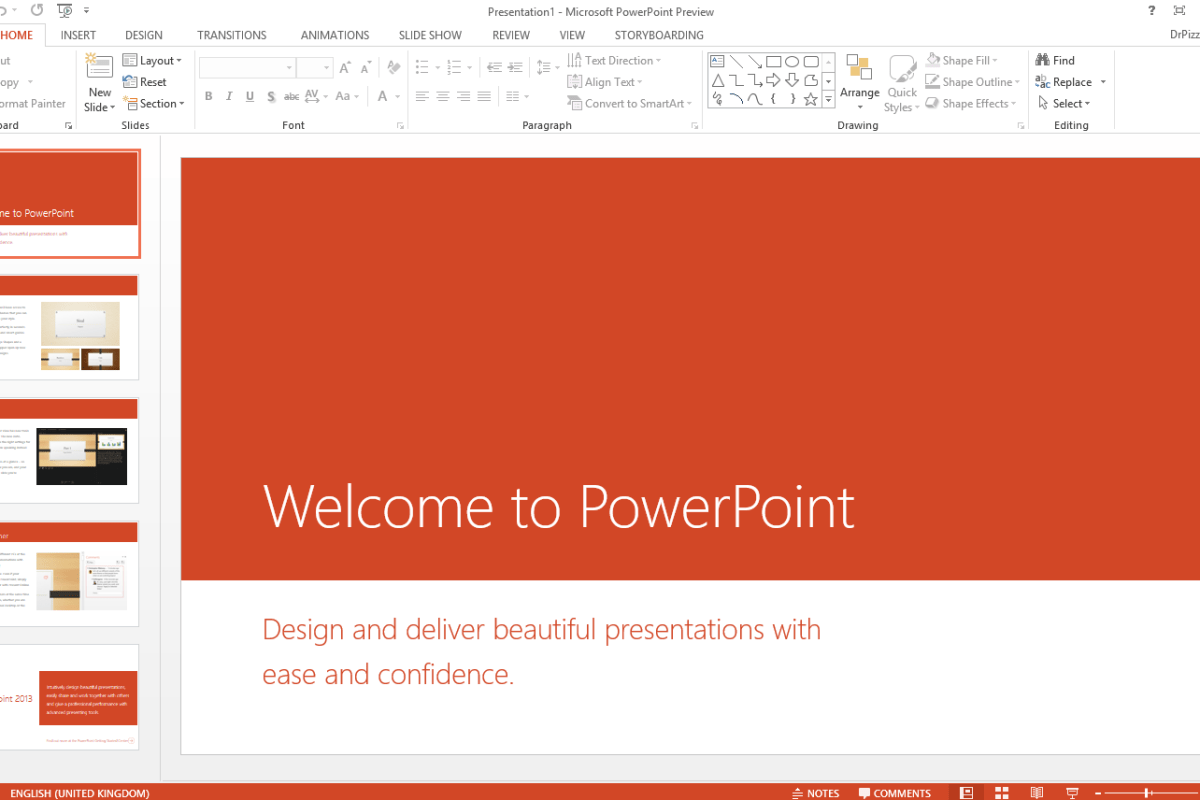
5 PowerPoint tricks excellent speakers use flawlessly

Delivering an excellent presentation depends heavily on the speaker’ support materials, and how he/she uses them effectively. One of these tools (and probably one of the most famous ones) is Microsoft PowerPoint.

I have been doing presentations and public speaking for over 12 years now, and performed before thousands of people worldwide, and I can tell the tricks that would capture the attention of the audience, and in this week’s tip, here’s 5 simple tricks you can use to transform your presentation style with.

1. Automatically Play Videos: Multimedia Always do the Job and using Video / Audio within your presentation has an impressive effect on your audience and I’ve seen even “boring” speakers capture the attention of their audience when they play a video. Just use the following Trick for that: Make the Video Play Full Screen and “Play Automatically” rather than “On Click”. Choose High Definition videos and make sure your audio is well heard across the room

2. Use Presenter View: now although this may seem an obvious tip, but believe me when I tell you that most speakers don’t use Presenter View, and they just Duplicate their screen. Luckily with the Latest version of PowerPoint 2013, it is Set by Default to use Presenter View and for all the right reasons
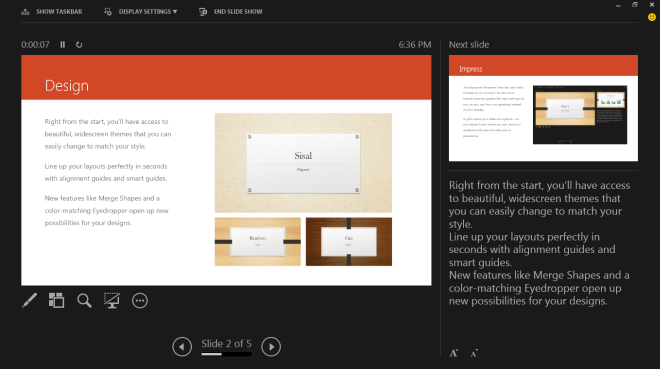
PowerPoint-2013-Presenter-ViewYou see the new presenter view is an amazing work of ART for presenters… it’s so well designed with features that would make the presenter shine without having his audience know what’s happening.
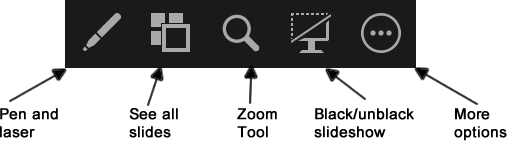
in-slide-controls

Couple of my favorite features would be: Using the Zoom Tool to zoom on a specific section in the slide, using the Pen & Laser to literally write notes on your slide and See All Slides where you can actually navigate between slides in real time, without the audience seeing that happening. And when you are in a situation that you will need to SKIP some slides or refer back to a previous slide (Like the CEO Suddenly Decided to jump on stage and say a word)… you can do that Smoothly!

How-to-navigate-your-slides-in-PowerPoint-2013-01

3. Use Video Backgrounds: a lot of speakers would be emphasizing on a specific idea by illustrating it with a Video and some would just say: “like what we’re going to see in the next video”… Here’s 2 mini-tips: 1) unless your audience are in kinder garden, don’t announce what you’re going to do 3 seconds later.. and 2) use Video backgrounds when possible; you can start playing a video while muting the audio to avoid distraction, and add items on top to highlight the points and make it start automatically while you keep on talking…

Video Background

4. Design LESS: they always say LESS is MORE… and in Presentations, try not to put all of your wordings into the slide and the READ your presentation to your audience, but use the Technique that all the legendary speakers (like the late Steve Jobs) use… Just 1 photo and 1 sentence can sometimes do the trick… Just make sure you photo fill a good portion of the screen and your 1 sentence is very visible (choose a nice font to go with it as well, rather than the default fonts)

set-and-execute-your-goals-main-page

For the above image, I used a combination of the same image 3 times, and applied a filter on each and let PowerPoint offer me Visual Aids 🙂

5. Embed background Sounds in your presentation when needed: sometimes your presentation is done in a modest environment with no support of audio/visual engineers and extra screens to display the text for you and all of the things that Executives have in their events… But that shouldn’t stop you from performing an emotional talk and engrave the echo on an idea in your audience’ heart. It is very simple with PowerPoint, just choose a good soundtrack and Insert it in your slide and use the Fading / cropping tool to match it to your tone, and the Volume shouldn’t be louder than your own voice. and Voila! 

Audio in PowerPoint

There you go!

Present like a Super Star and make a long lasting impression 🙂

See you Next week & Cheers,
SC

Samer Chidiac

Samer Chidiac is a Sr. Strategist, Author & an International Innovation Expert.

The Monday Tip Weekly blog is part of the “Influencing the Life of Others” project

You Only See What your Eyes Want to See

“It’s not what you don’t know that kills you, it’s what you know for sure that ain’t true.” ~ Mark Twain

You probably been in situations where you got stuck and ran out of ideas; you’ve been trying to solve an issue or a problem and you think too hard and you can’t seem to go anywhere with that… But after a while you just look at it Differently and you find the solution that has been sitting there all along!

One thing I’ve learned in my studies, is that Creativity is not something we are born with, but something we acquire, and it starts by noticing new ways and possibilities in every situation and in almost every scenario. Kids do that All the time, while grown-ups kinda “lost it”.

In this week’s tip, I’m going to make you try something first, it’s a very interesting experience, called the Monkey Business Illusion.

Watch the Video below and you’ll see what I mean 🙂

Incredible isn’t it!!! 

You see in Life we don’t see what we’re looking at… But instead, we see what we’re looking for! and by that, we truly miss NOTICING so many things 🙂

So the tip for this week, there it goes:

  • Lower your Fear of failure: by not looking for the failure in your potential successes
  • Be more aware of your surroundings, and the surroundings of your situations
  • Remember that what looks normal to the spider, is Chaos for the Fly 🙂

Cheers & Have a Nice week!
SC

Samer Chidiac

Samer Chidiac is a Sr. Strategist, Author & an International Innovation Expert.

The Monday Tip Weekly blog is part of the “Influencing the Life of Others” project

Change the world, one task at a time

“Never leave till tomorrow that which you can do today.” – Benjamin Franklin

Everyone’s job is important, no matter how small you think your tasks are; in fact an office that has decoration worth 1 Million dollars and accommodates dozens of executives, cannot operate 1 full day without a Bathroom :).

So whether your tasks are perceived as easy, hard, significant or not; You are Changing the World on your own terms! 

This week’s tip is about the magic of doing one thing at a time;

In my coaching path on productivity, I faced lots of very smart & talented individuals, who felt guilty everyday by thinking that they can do more with their time but fail to do so, in fact they are always Overwhelmed with tasks & projects that no matter how hard they work on them, there’s always more to do.

Normally, it’s a general miss-conception about being a Multi-tasking person that you need to have the ability to juggle so many things at the same time, and get away with it; as if you need to prove to yourself and to the world, that the more things you can handle, the smarter you are and deserve further respect.

Well, handling too many projects or tasks, is not necessarily bad, but giving each task the time and dedication it deserves is what matters in execution. Sometimes we swim in an ocean of thoughts, we’re thinking of the next project while we’re working on the current one, we’re thinking of fixing the car while we’re in a meeting, and sometimes a day-dream arise while you’re listening to a customer talking… and the list go on and on… STOP!!

The Tip is Simple, and it will save you so much time ahead and make you more productive; whatever task you want to do, just book an appropriate time to do it, and JUST DO IT!

It’s as simple, let’s say you need to take a decision on a specific task in a specific project, and that decision requires brainstorming with others; Just schedule the meeting, make it short and very precise, and when you all meet, announce that the purpose of this meeting is to do this SPECIFIC task, and in the meantime, talk about NOTHING but this task, no phones, no emails, no chatting… JUST this task; and if there are other things to take a decision on or need the rest of the attendees, DON’T take advantage of the meeting, and first repeat the same procedure (evaluate the time it requires, book it, and then just do it) and in this case, if you already booked 30 minutes for this meeting and you were done in 15, and the other task requires only 10 minutes, then discuss it during that time; but if it requires another 30 minutes, the appropriate thing to do is either EXTEND the current meeting time frame (with the approval of the attendees) or re-schedule another meeting to discuss ONLY that!

Practice this tip, and you will start seeing change in your productivity sooner than you think!

Have a great week,
SC

Samer Chidiac

Samer Chidiac is a Sr. Strategist, Author & an International Innovation Expert.

The Monday Tip Weekly blog is part of the “Influencing the Life of Others” project

5 Steps to Finish Your Daily Tasks

When I first started researching Time Management techniques, it was not because I loved the topic back then, it was just because my life was becoming miserable, I had so many things to do and not enough time to finish them.

Too Many Tasks

Is that you?  do you feel your life is simply like a treadmill? you need to put more effort RUNNING Just to Stand still? and it’s affecting your personal life? if the answer is YES then Congratulations you’re just like the rest of us!

In my Book, I discuss 10 Unbreakable Rules of  Time management, but in this post we’ll just go through 5 steps that will help you get through your daily tasks:

  1. Put all of your tasks on a piece of paper or on a computer: Take like 15 minutes everyday in the morning just to gather your thoughts together and put & review all the things you need to do on this day (Both Personal & Professional); and finally put them in front of you on a piece of paper or electronically. (It’s your TO-DO List… but for some reason, some hate this naming… so you name it whatever you want!)
  2. Estimate how long each task needs to be completed: Now that step is pretty much the most likely to be SKIPPED.. Even if you don’t know how long it may take, just ESTIMATE, and if the timing bypass the 1.5 hours, just split the task into more parts… so now you will have a List with tasks and time estimates
  3. Prioritize them: Prioritization is very powerful skill, and to make your life simple, just think of this… If you’re to take a Leave tomorrow for 2 months, which would be the tasks that you need to finish TODAY. So now you have a list filled with Tasks & Time Estimates prioritized by priority.
  4. Place them on your Calendar: If you don’t have a calendar and it’s working for you, then you shouldn’t be reading this post in the first place :)… So for the time being, the list is only a temporary place, you need to schedule the tasks on your calendar… and when you ran out of slots on your calendar, then whatever is left on your list will moved for later.
  5. STICK TO THE CALENDAR: Planning Time is OVER… You shouldn’t be wasting any time planning beyond the first 4 steps (that, again, shouldn’t take more than 15-30 minutes a day).. the rest of the day is dedicated for execution, and believe me… JUST DO THE TASK YOU PLANNED AT THE TIME YOU PLANNED AND DO NOTHING ELSE, and you’ll be more productive than you ever thought.

And finally remember, it’s not written in stone, you can always make room for something urgent that comes up, and you may get distracted during the day and some tasks will Slip… But don’t worry, it gets better with time and practice.

Whether you’re comfortable with technology or not, do explore using technology to your advantage.

Have a Nice week,
SC

Samer Chidiac

Samer Chidiac is a Sr. Strategist, Author & an International Innovation Expert.

The Monday Tip Weekly blog is part of the “Influencing the Life of Others” project